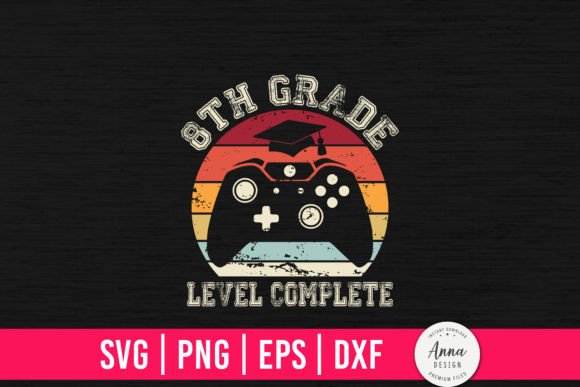
8th Grade Level Complete: A Milestone Design for Celebrating Achievements
Finishing eighth grade is a big deal. It marks the end of middle school and the beginning of high school. For students, parents, and teachers, this milestone deserves recognition. That is where the 8th Grade Level Complete design comes in. This digital file set allows you to create custom items that celebrate this accomplishment. Whether you run a small craft business or want to make a personalized gift, this design offers a straightforward way to produce meaningful keepsakes.
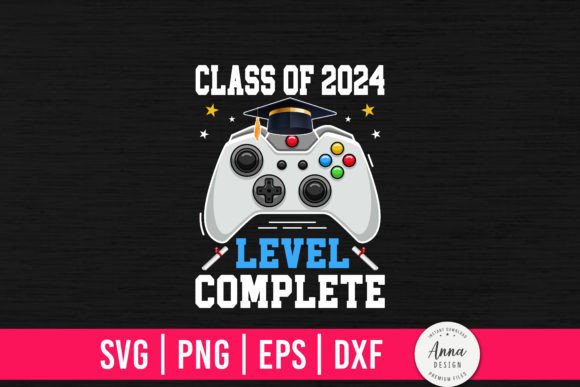
The concept behind 8th Grade Level Complete is simple: it borrows the familiar language of video game level completion to acknowledge a real-life achievement. The design appeals to kids who grew up with gaming culture and to adults who appreciate a clever, modern twist on traditional graduation themes. It works for T-shirts, mugs, stickers, pillows, decals, and many other items. Because it is delivered as a digital download, you can start working with it immediately after purchase.
What You Receive with the 8th Grade Level Complete Digital File
When you purchase the 8th Grade Level Complete design, you get a zipped folder containing four file formats. Each format serves a different purpose, so you can use the design with various software and cutting machines.
SVG – Scalable Vector Graphic
The SVG file works with Cricut and Silhouette cutting machines. It preserves crisp lines at any size, so you can scale the design for a small sticker or a large T-shirt without losing quality. This format is the go-to choice for most cutting machine projects.
DXF – Drawing Exchange Format
The DXF file is another vector option. It is compatible with many design programs and cutting machine software. If your workflow requires a different vector format, the DXF version gives you flexibility.
PNG Transparent – Raster Image with No Background
The PNG file has a transparent background, which makes it easy to place the design over any color or image. Use this format for quick printing projects, digital mockups, or when you need a ready-to-use image without additional editing.
EPS – Encapsulated PostScript
The EPS file is a standard vector format used by professional graphic designers. It opens in Adobe Illustrator, CorelDRAW, and other advanced design software. If you plan to modify colors, resize, or combine the design with other elements, the EPS file gives you the most control.
All four formats are included in the download. You do not need to purchase separate versions for different machines or software.
Who Benefits from the 8th Grade Level Complete Design
This design is not just for one type of user. It serves several groups effectively.
Small Craft Business Owners
If you run a home-based business selling on Etsy, at craft fairs, or through social media, the 8th Grade Level Complete design can expand your product line. You can create multiple items from one file: T-shirts, tote bags, mugs, decals, and more. Because the design is exclusive, it helps your shop stand out from others using generic graduation graphics.
Parents and Family Members
Want to surprise a graduate with a custom gift? The design lets you make a personalized T-shirt or pillow that the student will actually enjoy wearing and using. You do not need professional design skills. The files are print-ready, so you can upload them to a print-on-demand service or use your own cutting machine.
Teachers and School Staff
Schools often look for unique ways to celebrate students. Teachers can use the design to create classroom decorations, awards, or small gifts for the end of the school year. Since the file is digital, you can print as many copies as needed without worrying about minimum orders.
Party and Event Planners
If you organize graduation parties, the design works for banners, cupcake toppers, labels, and stationery. The consistent theme gives the event a cohesive look without requiring a graphic designer.
Practical Uses and Real-World Applications
The versatility of the 8th Grade Level Complete file set means you can apply it to many projects. Here are some examples of how people actually use these designs.
Apparel and Accessories
Iron-on or heat-press the design onto T-shirts, hoodies, caps, and tote bags. Because the SVG file is scalable, you can make adult sizes and child sizes from the same download. Many crafters create matching family shirts for graduation parties.
Home Decor and Keepsakes
Pillow covers, wall art, and framed prints make lasting gifts. The PNG format with a transparent background lets you layer the design onto different colored backgrounds or patterns. You can also resize it for a small plaque or a large poster.
Party Supplies
Cupcake toppers, favor tags, gift tags, banners, and invitations all benefit from a consistent design. The DXF file is especially useful for cutting intricate details with a machine, while the PNG works well for quick printing at home.
Stickers and Decals
Laptop stickers, water bottles, car decals, and notebook covers are popular items. The vector formats ensure clean cuts and sharp lines even at small sizes. You can sell individual stickers or bundle them with other graduation-themed items.
Digital Use
For social media posts, digital invitations, or email announcements, the PNG file is ready to use. You can drop it into Canva, Photoshop, or any other design tool to create custom graphics for your online channels.
Strengths of the 8th Grade Level Complete Design
Several features make this file set a strong choice for both personal and commercial projects.
- Immediate download – No shipping delays. You get the files within minutes of purchase.
- Multiple formats – SVG, DXF, PNG, and EPS cover nearly every common use case.
- Scalable vector art – Resize without losing quality, from a tiny sticker to a large banner.
- Transparent PNG included – Perfect for layering on different colored backgrounds.
- Commercial use allowed – You can create products to sell, which supports small business growth.
- Print-ready files – No need for additional editing unless you want to customize colors or text.
Considerations and Limitations
No product is perfect for every situation. Understanding the limitations helps you decide if this design fits your needs.
Digital Delivery Only
These are digital files, not physical items. You need access to a cutting machine, printer, or print-on-demand service to create physical products. If you expect a delivered item, this product will not meet that expectation.
Software Requirements
To modify the SVG, DXF, or EPS files, you need compatible software. Free options like Inkscape or Silhouette Studio Basic Edition work for many users. Paid software like Adobe Illustrator offers more advanced features. The PNG file works in any program that opens images.
Design Customization
The design comes as shown in the listing. If you want to change the text, colors, or layout, you need vector editing skills. The files are provided as graphic artwork, not as editable text layers. For users who want a fully customizable template, this may require additional effort.
Print Quality Depends on Your Equipment
The quality of the final product depends on your printer, heat press, or cutting machine. For best results, use high-quality materials and follow the manufacturer’s guidelines for your equipment. Test on scrap material before producing final items.
How to Evaluate If This Design Is Right for You
Before purchasing, consider your specific project and skill level.
- What machine do you use? – If you own a Cricut or Silhouette, the SVG file will work directly. For other machines, check compatibility with DXF or EPS.
- Do you plan to sell products? – If yes, verify that the license covers commercial use. This design does allow commercial use, which is a key advantage.
- How many items do you need? – Digital files are ideal for small batches or single items. For mass production, the scalability of vector files saves time and money.
- Do you want to customize colors? – The vector formats allow recoloring if you have the right software. The PNG is fixed but works well for quick projects.
- What is your budget? – Digital files cost less than physical products or hiring a designer. For one low price, you get unlimited use of the design.
Real-World Scenarios and Success Stories
Many crafters and small business owners have found creative ways to use the 8th Grade Level Complete design. Here are a few examples that illustrate its value.
A parent with a Cricut machine made personalized T-shirts for her son and his friends as end-of-year gifts. She used the SVG file to cut iron-on vinyl and applied it to blank shirts. The project took one afternoon, and the kids loved the gaming reference.
A small Etsy seller added the design to her graduation collection. She offered mugs, stickers, and pillows featuring the graphic. Within two weeks, she sold over 50 items, with the mug being the most popular. The exclusive design helped her listings stand out among generic graduation products.
A middle school teacher created a banner for the classroom party using the PNG file. She printed it on cardstock, cut it with scissors, and hung it behind the dessert table. The students appreciated the modern design, and the teacher saved money by printing at school.
A party planner used the design for a graduation open house. She made cupcake toppers, favor labels, and a guest book sign using the DXF file with her Silhouette machine. The consistent theme tied the decorations together, and the client was thrilled with the custom look.
Working with the Files: A Quick Guide
If you are new to digital cutting files, the process is straightforward. Here is a basic overview.
After downloading the zipped folder, extract the files to a folder on your computer. Open your cutting machine software and upload the SVG file (or DXF if your software prefers it). Adjust the size to fit your project. If you are making a T-shirt, measure the space where you want the design and scale accordingly. Send the file to your machine and cut your material. Weed the excess vinyl or paper, then apply the design using transfer tape or a heat press.
For print projects, open the PNG file in your design software. Place it on a background, add text or other elements if desired, and print. Because the PNG has a transparent background, it layers cleanly.
For professional modifications, use the EPS file in vector editing software. You can change colors, add effects, or combine the design with other graphics. Save a copy before making changes so you always have the original.
Why People-First Content Matters for Your Buying Decision
When you search for digital designs, you want information that helps you make a confident choice. That is why this article focuses on practical details rather than hype. The 8th Grade Level Complete file set is a tool. Its value depends on how it fits your project, your equipment, and your goals.
By understanding what each file format does, who can use it, and what to expect, you avoid surprises. You also get a clearer picture of whether this design matches your skill level and creative vision. The goal is not to sell you on a product you do not need, but to help you decide if this design solves a problem you actually have.
Final Thoughts on the 8th Grade Level Complete Design
Celebrating the end of eighth grade is a tradition that deserves fresh ideas. The 8th Grade Level Complete design offers a modern, playful way to mark this milestone. With four file formats included, it works for cutting machines, printing, and digital projects. Small business owners can expand their product offerings, parents can create personalized gifts, and teachers can add a fun element to classroom celebrations.
Because the files are digital, you get instant access and unlimited use. The scalable vector art ensures professional results at any size. While some customization requires basic software skills, the print-ready PNG file makes it easy for beginners to get started. As long as you understand the digital nature of the product and have the necessary equipment, this design delivers solid value.
Whether you are making one T-shirt for a proud graduate or building a product line for your craft business, the 8th Grade Level Complete design gives you a strong foundation. Pair it with quality materials and your own creative touches, and you will produce items that people actually want to wear, use, and share.