Free Decorative Butterfly: Versatile Design Resource
Design projects often need a touch of elegance without hours of manual drawing. A decorative butterfly graphic can instantly add lightness, symmetry, or a natural accent to a variety of creative works. The Free Decorative Butterfly package offers multiple file formats and high resolution, making it a practical choice for beginners and seasoned creators alike. This article explores what the resource contains, why different audiences may find it valuable, and how to evaluate it for your own projects.
What Is Included in the Free Decorative Butterfly Package
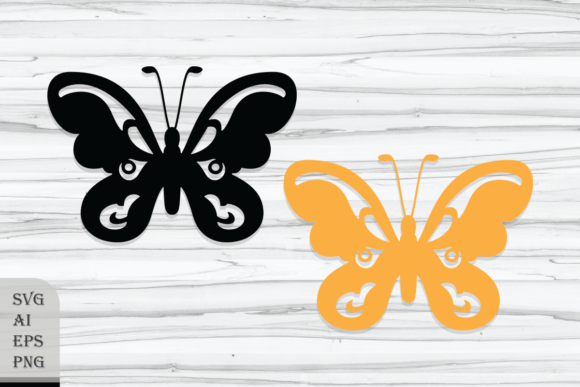
The archive delivers two distinct butterfly designs, each available in two PNG versions, two SVG files, two Adobe Illustrator (AI) files, and two Encapsulated PostScript (EPS) files. PNG images come at 4409 x 3110 pixels with a transparent background, all at 300 DPI. This resolution means prints can be sharp and clear, while the transparency allows you to layer the butterfly over any background without a white box. SVG, AI, and EPS formats provide vectors, so the design can be scaled to any size without losing quality. The files are delivered inside a single zip archive, ready for download and extraction.
This variety of formats acknowledges that different users work in different software environments. A sticker maker might prefer PNG for quick placement, while a packaging designer may need AI for precise editing. The inclusion of both raster and vector versions gives flexibility for screen use, print production, and further modification.
Beginners and Hobbyists
If you are new to design software, large PNG files with transparent backgrounds are a straightforward starting point. You can open them in any image editor, on a phone app, or in basic presentation software like PowerPoint or Google Slides. The 300 DPI resolution ensures that when you print a poster or a greeting card, the edges remain crisp. For a hobbyist making scrapbook pages or homemade gifts, the PNG version removes the need to understand vector paths or layers. You simply drop the butterfly onto your canvas and resize as needed.
Professionals and Advanced Creators
For designers who need to tweak colors, adjust curves, or combine the butterfly with other illustrations, the SVG, AI, and EPS files are essential. Vectors preserve the original path data, meaning you can change the fill color to match a brand palette or stretch the butterfly into a unique shape without pixelation. An illustrator working on a book cover might open the AI file, modify the wing patterns, and export at any size required by the publisher. The EPS format offers broad compatibility with older software versions and cross-platform workflows.
Educators and Marketers
Teachers creating classroom worksheets or digital lessons often need clipart that is clean, recognizable, and free of background distractions. The decorative butterfly can be used to illustrate life cycle lessons, count symmetry, or simply decorate a bulletin board. The transparent PNG makes it easy to insert into Word documents or Canva designs. Marketers might use the SVG for web graphics, ensuring the butterfly appears sharp on retina screens without requiring a separate high-resolution image. Both groups benefit from the fact that the files are already prepared – no need to spend time removing backgrounds or upscaling low-res images.
Practical Use Cases Across Creative Projects
Because the set contains two distinct butterfly designs, you have options for pairing or alternating. The following examples show how different users might leverage the same resource for very different end goals.
- Stationery design: A small business owner creating wedding invitation suites can place one butterfly as a delicate accent near the text. The vector file allows color matching to the wedding palette, while the high-res PNG works for digital previews.
- Wall art: An artist selling prints on Etsy can enlarge the SVG to poster size, arrange multiple butterflies in a pattern, and output a high-resolution PNG for print-on-demand production. The 300 DPI original already meets most print shop requirements.
- Clothing and sublimation: A t-shirt designer can open the AI file, adjust the butterfly outline for a cut-and-sew pattern, then use the SVG for heat press transfers. The transparent background is critical when layering on colored fabric.
- Crafts and stickers: Someone making vinyl stickers can import the SVG into a cutting machine software. The paths are clean, so the cutter follows the butterfly edge precisely. The PNG can be used for paper sticker sheets sold on marketplaces.
- Digital clipart: A blogger creating social media graphics can drop the PNG into a photo editing app and apply filters. The high pixel count means the butterfly remains crisp even when used as a large background element.
Each of these scenarios prioritizes different aspects of the files: ease of use, scalability, editability, or compatibility. The package delivers all those options, so you do not need to convert formats yourself or risk losing quality.
Evaluating Quality and Usability for Your Needs
When considering any free design resource, it helps to check a few specific qualities: resolution, background transparency, and vector reliability. The Free Decorative Butterfly set scores well on all three. The 4409 x 3110 pixel size at 300 DPI translates to about 14.7 x 10.4 inches at full resolution – ample for most print projects. For larger prints, the SVG/AI/EPS vectors can scale up without limit.
Transparency in the PNG files is genuine transparent alpha channel, not a pseudo-transparent or white background. This is crucial when you want to overlay the butterfly on a gradient or busy photo. In testing (or in your own use), you can verify that the edges are smooth and there is no leftover white halo – a common issue with lower quality clipart.
Vector files from this set are likely created with well-formed paths. For experienced users, opening the AI or EPS in Illustrator allows you to see the exact anchor points and curves. Beginners may prefer to leave the paths as-is and simply change colors via the fill option. Because the files are provided in industry-standard formats, they should open reliably in most vector editing programs (Adobe Suite, Inkscape, Affinity Designer, CorelDRAW, etc.).
One practical note: the package does not include any mockup templates. You receive only the butterfly graphic files. If your project requires a presentation mockup (like a butterfly on a notebook or wall), you will need to create that separately or combine the butterfly with your own background images. This is not a drawback – it simply means the resource is focused on the core asset, leaving you full creative control over the context.
Who Benefits Most from This Resource
The set serves a wide spectrum, but some groups may find it especially aligned with their workflow.
- Freelance designers often need versatile assets that can be adapted quickly for different clients. Having vector and raster versions ready saves time. When a client asks for a last-minute change, you can reopen the AI file and adjust without starting from scratch.
- Small business owners selling digital or physical products appreciate that the butterfly can be used commercially (ensure you check the specific license terms, but many free decorative sets allow commercial use with restrictions). It can appear on multiple products with minimal extra effort.
- Educators and non-profit organizations often work with limited budgets. Free, high-quality clipart reduces the need to subscribe to stock photo services. The transparent PNG is especially classroom-friendly for printing worksheets or projecting on interactive whiteboards.
- Hobbyists exploring new skills can use the SVG to learn how vector graphics work. By opening the file in a free editor, you can inspect the layers and start understanding path editing. It’s a low-risk way to build confidence before designing your own vectors.
At the same time, some users might find the set overkill. If you only need a single black-and-white outline for a simple sticker, the two design variations may be more than necessary. However, having extras never hurts – you can always ignore one design and focus on the other.
Matching the Resource to Your Project Goals
When deciding whether the Free Decorative Butterfly fits your needs, consider your primary goal.
- Goal: Immediate print use. Pick the PNG file. It is ready to drop into a word processor or photo editor. No extra software required. Ensure your print size is within about 14 inches to keep sharpness, or use the vector if you need larger.
- Goal: Full creative customization. Start with the AI or EPS file. You can change every curve, color, and effect. This is ideal for branding or unique art pieces.
- Goal: Web or screen display. SVG is your best choice. It loads quickly, scales with browser zoom, and remains crisp. The PNG can also work, but file size is larger.
- Goal: Learning or teaching. Open the SVG in a code editor to see the XML structure of the paths. For classroom demonstrations, the transparency in PNG helps explain layering concepts.
Also consider your skill level. Beginners should start with the PNG and gradually experiment with the vector files. Professionals can immediately dive into the AI to make structural edits. The resource accommodates both paths.
Long-Term Value and Versatility
A decorative butterfly graphic is not a seasonal asset. It can be used in spring-themed designs, nature projects, beauty branding, wedding materials, children’s books, and countless other contexts. Because the designs are decorative (not highly realistic or tied to a specific trend), they retain relevance over time. The high resolution and vector formats mean the files remain useful even as your software or output needs change. You might use the PNG today for a quick social media post, then later revisit the AI file for a large banner.
The absence of mockups in the package is a neutral factor – some users prefer clean assets without extra clutter. If mockups are important to you, they can be obtained separately. The core files themselves provide the foundation for hundreds of projects.
Ultimately, the Free Decorative Butterfly set offers a balanced mix of quality, format variety, and design appeal. It caters to creators who value time savings without sacrificing output quality. By understanding what each file type does and how it fits different workflows, you can extract maximum value from this resource. Whether you are designing a single sticker or a full product line, these butterflies can add a refined, effortless detail to your work.