Metallic Textured Stars on White
Some design elements look beautiful in a preview, but fall apart when you try to use them. The Metallic Textured Stars on White set is not one of those resources. This collection of twelve high-resolution JPG files delivers exactly what the name promises: metallic textured stars placed on a clean white background, rendered at 300 dpi with a generous 3333 by 3333 pixel canvas per file. The zip archive keeps everything organized from the moment you download. What makes this set genuinely useful is the combination of contrast, texture, and scale. The metallic finish catches light in a way that flat digital graphics cannot, while the white backdrop gives you a neutral starting point for almost any project. Whether you work in print, on screen, or with physical materials, these stars are designed to be adapted, not just admired.
What the Set Offers and Why It Works
The twelve files in this collection each feature stars with a distinct metallic appearance. Some lean toward gold, others toward silver or bronze, and several occupy the space between, with subtle shifts in tone that make the set feel cohesive but not repetitive. The texture is the defining feature. Instead of smooth, uniform shapes, each star shows grain, light variation, and a tactile quality that suggests real metal foil. At 3333 pixels square, the images give you room to crop, scale, and reposition without losing detail. The 300 dpi resolution means print reproduction stays sharp even at larger sizes. For digital applications, you can downsample cleanly without introducing artifacts. The white background is not an afterthought. It provides a consistent foundation for compositing, so you can drop these stars into layouts, layer them over color fields, or cut them out with minimal cleanup.
Who Benefits Most from This Resource
Creators come to this set from different directions, and the value changes depending on your workflow.
Wedding and Event Planners
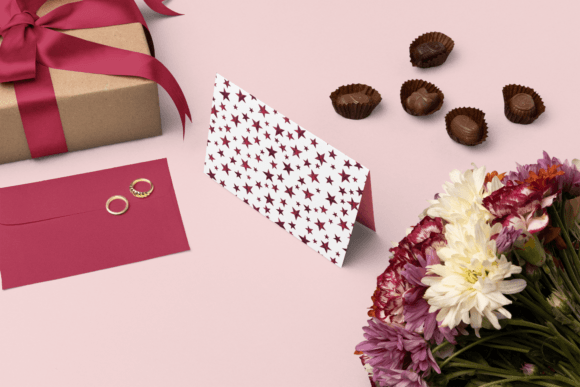
If you design invitations, place cards, table numbers, or favor tags, the Metallic Textured Stars on White files give you a ready-made decorative element that reads as premium without requiring custom foil stamping. Pair a single star with elegant typography on a save-the-date card. Use a cluster of smaller stars as a subtle background texture for a menu. The metallic quality works especially well for evening events, holiday parties, and celebrations where a little sparkle sets the tone. Because the files are large, you can scale one star to fill an entire envelope liner and still retain the texture detail.
Graphic Designers and Stationers
For designers working on branding, packaging, or printed collateral, these stars offer a shortcut to a polished look. The metallic texture adds depth that flat vector stars cannot replicate. Use them as accent marks on business cards, as decorative borders on thank-you notes, or as standalone motifs on gift wrap. The white background makes it easy to place the stars into existing layouts using blend modes or layer masks. If you design for clients in the luxury or lifestyle space, the set helps you deliver a tactile, refined aesthetic without the cost and lead time of physical foil printing.
Paper Crafters and Hobbyists
Print, cut, and glue. Die-cutting enthusiasts will find the large format files ideal for creating physical stars with metallic finishes. Print on heavy cardstock, cut by hand or with a machine, and use the resulting shapes for scrapbook pages, handmade cards, or gift toppers. Decoupage and mixed-media artists can cut out individual stars and layer them onto journals, canvases, or home decor objects. The texture reads as dimensional even after sealing, which gives finished pieces a rich, curated appearance. Origami folders can print the stars onto thin paper and fold them into modular ornaments or garlands, keeping the metallic pattern visible on both sides when printed correctly.
Small Business Owners and Entrepreneurs
If you run a shop that sells handmade goods, printed stationery, or party supplies, the Metallic Textured Stars on White set can become part of your product line. Create custom gift tags with a hole punch and ribbon. Design labels for candles, soaps, or small-batch products. Offer personalized birthday decorations featuring the stars. The files give you a consistent visual signature that elevates everyday packaging into something customers want to photograph and share. For digital products, you can incorporate the stars into printable planners, sticker sheets, or card templates. The versatility reduces the time you spend sourcing or creating decorative assets from scratch.
Practical Project Ideas to Explore
The set works across a wide range of formats and contexts. Here are several approaches to consider, each with a slightly different creative angle.
Invitations and Save-the-Dates
Start with a single large star centered on the card front. Place the event details to one side, using a clean serif or sans serif typeface. The metallic texture provides enough visual interest that you do not need additional ornamentation. For a more elaborate look, create a border by repeating smaller stars along the top and bottom edges. The white background of the files blends naturally with white or cream cardstock, so the stars appear to float on the paper surface. If you want to add color, place the stars over a pastel or neutral background using a soft blend mode in your editing software.
Gift Tags and Packaging
Print the stars at a medium scale, cut them out, and punch a hole at the top. Thread a metallic cord through the hole and attach to gift bags, boxes, or wrapped presents. The recipient sees a handmade detail that feels intentional rather than hastily assembled. For packaging, reduce the star opacity and tile the pattern across a full sheet of wrapping paper. Alternatively, print a single large star as a label for a product jar or box, with the product name overlaid in a contrasting color.
Die-Cutting and Decoupage
Import the JPG files into your die-cutting software and adjust the cut line to follow the star outline. Use a machine like a Cricut or Silhouette to cut the stars from printed cardstock. Because the files are high resolution, you can scale them up to six inches or more and still achieve clean cuts. For decoupage, cut out individual stars of varying sizes and arrange them on a journal cover, a picture frame, or a wooden box. Apply a thin layer of decoupage medium over each star and seal the entire surface. The metallic texture remains visible through the sealant, giving the finished piece a luminous, layered quality.
Origami and Paper Sculpture
Print the stars onto lightweight paper that holds a crease well. Fold simple modular stars, three-dimensional star ornaments, or even star-shaped envelopes. The metallic pattern adds visual complexity to the folded forms, so you do not need to decorate them further. Use the finished pieces as table scatter, garland components, or hanging decorations. For a unified party theme, coordinate the star colors with your existing palette. The set includes enough tonal variety that you can mix warm and cool metallic accents in the same project.
Birthday and Party Decorations
Print the stars at different sizes and mount them on cardstock or foam board. Create a photo backdrop by clustering stars across a large panel. Use them as cupcake toppers attached to toothpicks or wooden skewers. Design a banner by stringing stars along a ribbon with hot glue or tape. The metallic finish catches both natural and artificial light, so the decorations stand out in photos and in person. For children's parties, combine the stars with colorful accents. For adult celebrations, keep the palette monochromatic and let the texture carry the visual weight.
Journaling and Planners
Reduce the star size in your editing software and print a sheet of small stars. Cut and paste them into a bullet journal or planner as page markers, habit trackers, or decorative accents. The metallic texture adds a tactile element to an otherwise flat page. Use the stars to highlight important dates or to mark completed goals. Because the files are JPG, you can also import them directly into digital planning apps and resize them as needed. The white background blends with most digital canvas colors, making the stars easy to place without extensive editing.
Adapting the Stars for Different Formats and Audiences
The way you use the Metallic Textured Stars on White set depends on the platform and the audience you are trying to reach. For printed materials, the high resolution and 300 dpi ensure the metallic texture renders accurately on coated or uncoated paper. Test a sample print before committing to a large run, because the metallic appearance can shift slightly depending on the paper finish. Glossy papers usually enhance the reflective quality, while matte papers soften it. For digital use, compress the files if needed, but keep a master copy at full resolution. The 3333 pixel width means you can fill a full screen background or a large banner without visible pixelation. For social media graphics, scale the stars to fit your template and use them as overlays or accent elements. The texture reads especially well on high-resolution displays and in video thumbnails.
Keeping Results Clear and Consistent
Several principles help maintain a professional look when working with these files. First, resist the temptation to overcrowd. The metallic texture is inherently active, so a single star often carries more visual impact than a cluster of ten. Give each star room to breathe. Second, pay attention to color temperature. The metallic tones in the set range from warm gold to cool silver. Keep within one temperature family per project, or deliberately mix them for a eclectic, modern feel. Third, maintain consistent lighting expectations. If you use the stars in a digital composite, match the light direction and intensity of the other elements. Fourth, when printing, choose a paper stock that supports the resolution. Cheap paper can blur the texture and flatten the metallic effect. Finally, save your working files in a lossless format like TIFF or PSD so you can revisit and tweak the layout without re-editing the original JPGs.
Practical Recommendations for First-Time Users
Before starting a major project, open all twelve files and review the range of tones and textures. Some stars appear more polished and reflective; others have a brushed or aged quality. Decide which aesthetic fits your project. If you are designing for a modern brand, the brighter, cleaner stars might work best. For vintage or rustic themes, the softer, darker textures add character. Experiment by placing different stars into your layout software and adjusting scale and rotation. The large canvas size gives you flexibility to crop tightly or use the full frame. Keep the original zip archive intact as a backup. If you plan to use the stars across multiple projects, create a folder structure that separates the files by tone or application. This small organizational step saves time later.
The Metallic Textured Stars on White set delivers exactly what creative professionals need: high-quality assets that work across print and digital media, with enough texture and variation to support a wide range of applications. Whether you are designing a wedding invitation, building a product label, or decorating for a birthday party, these stars provide a reliable, elegant foundation. The challenge is not in making them look good, but in choosing where to stop. Let the texture do the work.