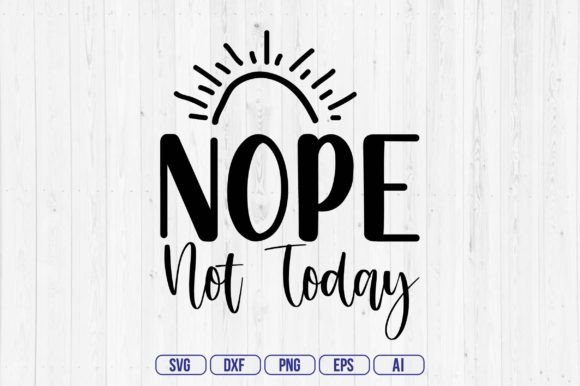
Nope Not Today
When you work with digital design assets, the difference between a smooth project and a frustrating one often comes down to file formats and preparation. Nope Not Today is a complete digital download bundle that gives you five essential file types from a single source. Whether you are cutting vinyl with a Cricut, editing vectors in Adobe Illustrator, or preparing graphics for a marketing campaign, this bundle is built to fit into your existing process without extra steps or conversion hassles.
What Nope Not Today Includes and Why It Matters
Your purchase delivers a single .zip file containing five separate files: SVG, PNG, EPS, DXF, and AI. Each format serves a distinct purpose, and having them all upfront means you never have to stop and recreate a file type mid-workflow. The SVG file is layered and ready for use with design cutting machines, while the PNG offers a transparent background at 300 DPI for web and print use. The EPS vector file remains editable, the DXF file works with CAD software, and the AI file provides the native Adobe Illustrator source. This range covers virtually every common use case for a digital graphic asset.
Where Nope Not Today Fits in a Real Workflow
Understanding where a resource fits into your process is key to using it effectively. Nope Not Today can be used at multiple points depending on your role and goal.
Before a Project: Planning and Asset Preparation
When you are mapping out a new design or marketing campaign, gather your assets early. Having the Nope Not Today bundle on hand means you can plan which format you will need for each output. If you are making stickers, the SVG file goes into your cutting software. If you are preparing a social media graphic, the transparent PNG is ready to layer into your compositing tool. By downloading and organizing the bundle before you start, you avoid scrambling for the right file format later.
During a Project: Direct Integration Without Conversion
Mid-workflow is where this bundle really shines. Instead of opening an online converter and risking quality loss, you simply choose the file that matches your current tool. For example, a Cricut user can drag the layered SVG directly into Design Space and begin cutting. An Adobe Illustrator user opens the AI file and edits individual layers as needed. The EPS file works similarly in CorelDRAW or older vector editors. Because each format is already optimized, you spend time on actual design work rather than file troubleshooting.
After a Project: Archiving and Reuse
After completing a project, you may want to store the asset for future use. The AI source file is ideal for archiving because it retains all layers and editing history. If you later need to modify the design for a different medium, you can open the AI file and export to whatever format you need. The DXF file can be archived alongside CAD or 3D modeling projects. This forward-looking approach saves hours when you revisit a design months later.
Compatibility Across Tools and Platforms
The Nope Not Today bundle is compatible with a broad range of software and hardware. SVG files work natively with Cricut Design Space, Silhouette Studio, Inkscape, and most modern browsers. PNG files load into Photoshop, Canva, and any image editor. EPS files open in Adobe Illustrator, CorelDRAW, and Affinity Designer. DXF files are used in AutoCAD and many laser cutting programs. The AI file requires Adobe Illustrator or a compatible alternative. This compatibility reduces friction when moving between different parts of your creative or production pipeline.
Practical Implementation Tips
Getting the most out of Nope Not Today involves a few straightforward practices.
- Unzip and organize: Once you download the .zip file, extract the contents into a dedicated folder. Name the folder clearly (e.g., “Nope_Not_Today_Assets”) so you can find it later. Create subfolders by format if you work with multiple projects simultaneously.
- Check file layers before use: The SVG file is word-by-word layered, meaning each word in the design is a separate layer. Open the file in your cutting software first and review the layers. You can hide, recolor, or separate elements without redrawing anything.
- Respect DPI for print: The PNG file is 300 DPI, which is press-quality. Use it directly for print-on-demand products, signs, or digital display. Do not scale it up beyond its pixel dimensions unless you recreate it from the vector source.
- Keep the AI file as master: For any long-term changes, always edit the AI file. Export to SVG, PNG, EPS, or DXF as needed. This maintains a single source of truth and prevents version drift.
- Test one cut first: If you are cutting vinyl or HTV, do a small test cut with the SVG file on scrap material. Verify that the layers align correctly and the blade depth is appropriate. Adjust in your software if needed.
How Nope Not Today Interacts with Other Resources
This bundle does not exist in isolation. It fits into a larger ecosystem of tools, methods, and decisions.
- With a Cricut or Silhouette machine: The SVG file is the primary input. Import it into your machine’s software, adjust size and placement, and attach to your mat. The layered structure allows you to cut different colors by assigning each layer to a separate operation.
- With Adobe Creative Cloud: Open the AI file in Illustrator for full editing. Use the PNG in Photoshop for compositing. The EPS file can be placed into InDesign for layout. This seamless integration speeds up multi-tool workflows.
- With online marketplaces: If you sell digital or physical products, the PNG file works for listing images and the SVG file is perfect for instant download products. You can also bundle the AI or EPS for advanced customers.
- With laser engraving or CNC: The DXF file is ready to import into LightBurn or other laser control software. Check the design scale and layer assignment to match your material and power settings.
- With team collaboration: If you share files with other designers or production staff, the universal nature of EPS and SVG ensures everyone can open them regardless of their operating system or software version.
Usability and Organization for Long-Term Use
Having the right file formats is only half the battle. Consistent organization ensures you can retrieve and reuse Nope Not Today months or years later.
Create a naming convention that includes the design name, date, and format. For example, “Nope_Not_Today_SVG_2025-02-14” makes sorting and searching straightforward. Store the .zip file as a backup in cloud storage, but keep the extracted files in an active project folder. If you use a digital asset management system, tag the bundle with keywords like “SVG,” “layered,” “cut file,” and “vector” so it appears in relevant searches.
Quality control also matters. Before you start any critical production run, open each format one time to confirm it renders correctly. Verify the PNG transparency has no stray pixels. Ensure the DXF uses clean polylines. This upfront check takes five minutes but prevents ruined materials or missed deadlines.
Efficiency and Consistency Across Projects
One of the strongest arguments for a bundle like Nope Not Today is consistency. When you always start from the same well-prepared source files, your output quality remains uniform. The SVG layer structure is consistent across different words, so your cutting machine behaves predictably. The PNG background transparency is reliable every time. This predictability lets you focus on creative variation rather than technical variation.
For small business owners, this consistency translates to fewer returns or reprints. For educators, it means your students or workshop participants all start from a clean file. For hobbyists, it reduces frustration and allows more time making and less time fixing.
Adapting the Bundle to Different Work Styles
Not everyone works the same way, and Nope Not Today accommodates multiple approaches.
- Batch workers can prepare all files in one sitting: unzip, rename, validate, and store. Then when a project arises, the asset is ready to drop in.
- Iterative designers can work directly with the AI file, making incremental edits and exporting final copies as SVG or PNG as they go.
- Just-in-time producers can download the bundle, immediately open the DXF for laser cutting, and produce physical goods within minutes.
- Planners and project managers can list the bundle as an asset in their project timeline, noting which format is needed at which phase. This reduces last-minute format requests from team members.
The key is to match the bundle’s strengths to your personal rhythm. If you prefer to work ahead, organize everything day one. If you work reactively, keep the .zip file handy and extract only the format you need at the moment.
Final Observations on Process Integration
Nope Not Today is more than a set of files. It is a small but significant piece of a larger workflow puzzle. By providing the five most common formats from the start, it removes the need for file conversion, redrawing, or sourcing missing types separately. That reduction in friction has a compounding effect over multiple projects. Each time you use the bundle, you save a few minutes of format hunting. Over a year, those minutes add up to hours.
Whether you are a Cricut enthusiast creating custom apparel, a marketer preparing social graphics, or an educator teaching vector basics, having the right format ready at the right stage makes your process feel deliberate and controlled. Nope Not Today fits naturally before, during, and after your work, supporting both the planning phase and the final production. Integrate it into your digital toolkit, and you will spend less time on file logistics and more time on the actual making.