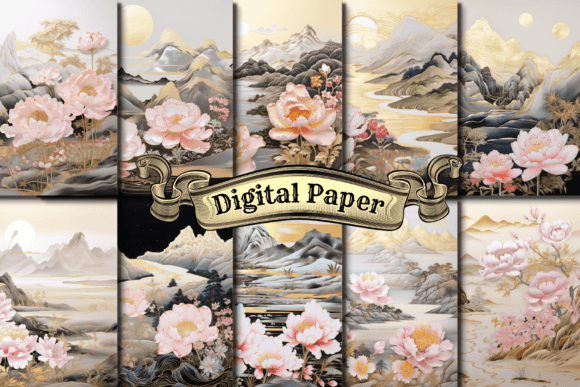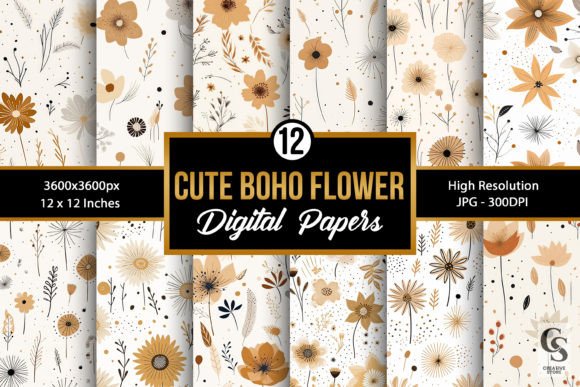
Cute Boho Flowers Digital Papers
When assembling a creative project, the right background paper can define the entire mood. Cute Boho Flowers Digital Papers is a collection of twelve seamless patterns that combine floral motifs with a bohemian aesthetic. Each design is rendered at 300 dpi, with JPG files sized 3600 x 3600 pixels (12 x 12 inches), delivered in a single zip file. These files are intended for use in a wide range of craft and design applications, from greeting cards to notebook covers. This article evaluates the set for someone weighing whether it fits their specific project needs, exploring its strengths, trade-offs, and realistic alternatives.
What the Set Offers
At its core, this product provides twelve distinct digital papers. Each paper features a seamless pattern, meaning the design repeats without visible edges when tiled. The files are high-resolution, which preserves detail when printing or scaling. The bohemian floral style typically incorporates loose, whimsical flower arrangements, earthy or muted color palettes, and a hand-drawn feel. The collection is positioned as a versatile resource for crafters, designers, and DIY enthusiasts who want a cohesive set of backgrounds without creating patterns from scratch.
It is important to note that these are digital downloads. After purchase, you receive a zip file containing the twelve JPG files. No physical paper is shipped, and no editable design files (such as PSD or AI) are included. You are buying ready-to-use raster images, not layered templates or vector artwork. This distinction matters for workflow, which we will discuss later.
Why Someone Might Consider These Papers
Interest in a product like this usually stems from a need for time-saving, high-quality, and aesthetically consistent backgrounds. Several practical reasons may drive someone to evaluate this specific collection.
Consistency across projects. When working on a series of items, such as invitations for a boho-themed event, having twelve coordinated patterns ensures a unified look. You can mix and match without worrying about clashing styles or color shifts.
Print-ready resolution. The 300 dpi standard and 3600 x 3600 pixel dimensions mean these files output well on most home printers and professional print services. For a 12-inch square print, you get crisp edges and smooth color transitions. If you plan to print at larger sizes, you can scale the designs somewhat, though extreme enlargement may soften detail.
Seamless tiling. If you need to cover a large surface (like wall art, wrapping paper, or a notebook cover), seamless patterns eliminate visible repeat lines. This is a significant practical advantage over non-seamless papers, which require careful alignment and often show seams.
Versatility in craft categories. The listed use cases, gift wrapping, greeting cards, planners, journals, invitations, scrapbooking, DIY projects, stationery, backgrounds, wallpapers, wall art, tumbler wraps, and notebook covers, reflect the range of projects one person might tackle. A single purchase can serve multiple purposes over time.
Benefits and Practical Trade-offs
No product is ideal for every scenario. Below is a balanced look at what works well and where you might encounter limitations.
Benefits
- Time savings. Creating a seamless floral pattern from scratch can take hours of drawing, scanning, and adjusting. Here, the design work is already done.
- Consistent aesthetic. The twelve patterns share a visual language, making it easier to build a cohesive brand or event theme.
- High resolution. At 3600 x 3600 pixels, you have room to crop or resize for many standard formats while retaining print quality.
- Broad file compatibility. JPG is a universal format. It opens in nearly every program, from Microsoft Word to Adobe Photoshop, and uploads easily to print-on-demand platforms.
- Immediate access. As a digital download, there is no shipping delay. You can be printing within minutes of purchase.
Trade-offs and Considerations
- No transparent backgrounds. Since these are JPG files, the background is solid (typically white or a solid color). If you need the floral pattern to sit over another image or color, you would need to cut it out manually or use composite techniques in photo editing software.
- Fixed color palette. You cannot easily change the colors of the flowers or background unless you have advanced photo editing skills and software. For those who need a specific brand color or a different mood (e.g., dark background instead of light), this set may not be adjustable.
- Raster format limitations. JPG files are pixel-based. Enlarging them beyond a moderate percentage can cause pixelation. For large-format prints (posters, banners), you may need to check the effective resolution after scaling. Vector alternatives would scale infinitely but are not provided here.
- Twelve may be too few or too many. For a single project, you might only use two or three patterns. For a large product line, twelve patterns might feel repetitive. Evaluate whether the number of designs suits your scope.
- File compression. JPG uses lossy compression. While the 300 dpi setting preserves good quality, repeated saves or heavy edits can degrade the image. For archival or maximum quality needs, some users prefer PNG or TIFF formats.
When This Collection Is a Strong Fit
There are specific contexts where Cute Boho Flowers Digital Papers can meet a project requirement efficiently.
Boho-themed events. If you are planning a wedding, birthday party, or baby shower with a bohemian floral theme, these patterns can be used for invitations, place cards, menus, favor tags, and thank-you notes. The unified style minimizes design effort.
Small-batch stationery and paper goods. Someone creating a small line of notebooks, journals, or greeting cards can use these papers for covers and inserts. The resolution supports short-run digital printing.
Scrapbooking and memory keeping. For physical scrapbook layouts, the 12 x 12 inch size matches standard scrapbook pages. You can print at home and cut or layer to build pages.
DIY home decor. Wall art, framed prints, or decoupage projects benefit from high-resolution seamless patterns. The boho aesthetic is popular in interior design, and these papers can be used to create custom decor pieces.
Digital backgrounds. For social media graphics, blog headers, or digital planner pages, these JPG files can be loaded directly into design tools. The size allows for cropping to various aspect ratios without losing quality.
When Alternatives May Be Worth Considering
Not every project aligns with the strengths of this set. Below are situations where different options might serve you better.
Custom branding requirements. If you need a specific color scheme, logo integration, or custom illustration style, off-the-shelf papers will not suffice. A graphic designer or a custom pattern service would be a better route. Similarly, if you need vector files for scalable logo work or large signage, look for EPS or SVG pattern sets.
Larger product runs. For commercial print runs of hundreds or thousands of units, you may need higher-resolution files (600 dpi or more) or specific color profiles (CMYK). While these files can be converted, you should test print a sample first. Some commercial printers prefer layered vector files or at least PNG with transparency.
Different aesthetics. If your project calls for a minimalist, modern, rustic, or vintage look, a boho floral set may not fit. The aesthetic is distinct, and attempting to force it into a different theme can look mismatched. In that case, seek out pattern collections that match your specific style direction.
Need for transparency or layering. If the pattern must appear over a colored background, magazine layout, or photo, JPGs with solid backgrounds create extra work. A set of PNG files with transparent backgrounds, or vector patterns, would be more practical.
Extreme enlargement. For banners, billboards, or large wall murals, raster images pixelate at high magnification. Vector-based patterns or custom large-format artwork would be more appropriate. Even a 3600-pixel image loses detail when printed at 48 inches wide.
Practical Decision-Making Insights
To decide if this collection is right for you, start by mapping your project requirements against the product specifications.
Clarify your output medium. Will you print at home, use a local print shop, or upload to an online printer? Digital prints (inkjet or laser) often accept JPG at 300 dpi well. For commercial offset printing, you may need to convert to CMYK and check color profiles. Requesting a sample print from your service provider can prevent surprises.
Assess your design skills. If you are comfortable with photo editing software like Photoshop or GIMP, you can extract elements, adjust colors, or composite these papers into more complex projects. If you are a beginner, these files work best as-is, directly as backgrounds. Be realistic about the level of customization you can achieve.
Consider the project scale. For a single event or a limited run of handmade items, twelve patterns offer plenty of variety. For a full product line across multiple categories (e.g., 50 different notebook designs), you may need a larger collection or multiple sets to avoid repetition.
Test before committing. If you are uncertain about the aesthetic fit, look for preview images that show all twelve patterns. Pay attention to color tones (are they warm, cool, pastel, saturated?) and the density of the florals (are they large, small, sparse, dense?). This gives you a concrete sense of how the papers will look in your project.
Budget vs. time. If you value speed and convenience, buying a ready-to-use set saves hours or days of design work. If you have specific creative vision and the skills to produce custom patterns, you might prefer to make your own. The price point of digital paper sets is generally very low relative to the time saved, making them a cost-effective option for many crafters.
Evaluating Alignment with Your Goals
Ultimately, the value of Cute Boho Flowers Digital Papers depends on how closely its characteristics match your project objectives. Ask yourself a few questions.
Does the boho floral style align with the tone of my project? If you are creating something whimsical, earthy, or romantic, the answer is likely yes. If you need something clean, corporate, or science-oriented, it is probably not.
Do I have the tools and skills to use JPG files effectively? For most craft and DIY applications, JPG files are straightforward. If you plan to use them in design software, ensure you know how to insert images, scale them, and print or export.
Is the file size and format compatible with my workflow? The 3600 x 3600 pixel dimension is generous for most personal projects. However, if you are working with templates that require specific dimensions or file types (like PDF for print-on-demand), you may need to convert or resize the files, which adds a step.
Will the number of patterns provide enough variety? Twelve distinct patterns is a moderate collection. For a small project, this is ample. For a diverse product line, you might want to supplement with other sets or mix in solid colors for balance.
Am I comfortable with the limitations of a raster file? If your project requires infinite scalability, transparency, or easy color changes, you may need to look for vector or layered digital paper sets. If you are printing at standard sizes and using the patterns as backgrounds, raster JPG files work very well.
Considering these points will help you determine whether this product supports your creative goals or whether an alternative approach would be more effective. The main advantage of a dedicated digital paper set is the convenience of having pre-made, professional-quality designs ready to use. The trade-offs involve flexibility, format constraints, and aesthetic specificity. By weighing these factors against your own requirements, you can make an informed choice that saves time and produces satisfying results.