My Students Are the Reason: A Digital Design Set for Meaningful Projects
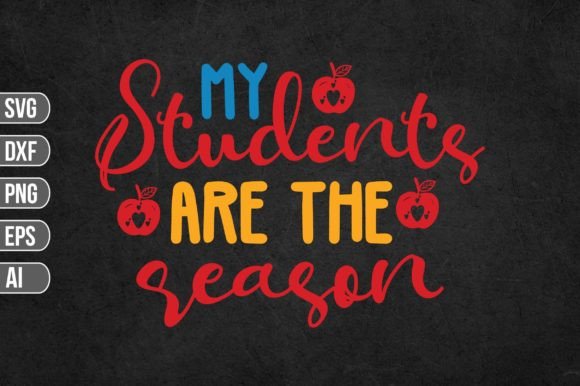
There is something powerful about expressing purpose through design. The phrase My Students Are the Reason carries a depth that resonates with educators, mentors, and anyone whose work is rooted in guiding others. This digital download set turns that sentiment into a versatile creative asset. Whether you craft classroom decor, personalize gifts, or build brand materials that reflect your mission, having a ready-to-use design file eliminates guesswork and frees you to focus on what matters most—the message and the people behind it.
The kit includes one .zip file containing five format options: an SVG file with word-by-layer support for Cricut, a 300 DPI transparent PNG, an editable EPS vector, a DXF file for AutoCAD, and an AI file for Adobe Illustrator. This range ensures you can work across platforms without reformatting or losing quality. Below, we explore how each component serves different creative and professional goals, who benefits most, and what to consider before downloading.
What Makes This Digital File Set Different
A design file is only as useful as its adaptability. My Students Are the Reason is built to fit into real workflows, not just sit in a folder. The SVG file is layered by word, which is a thoughtful detail for anyone using a cutting machine. Instead of a single merged shape, each word sits on its own layer. This allows you to resize, recolour, or rearrange parts independently without destroying the original layout. If you want the word “Reason” in a different colour or need to scale the phrase to fit a small tag, you can do that in seconds.
The PNG file comes at 300 DPI with a transparent background. This is the go-to format for digital use—social media graphics, blog headers, email signatures, or print-on-demand mockups. No white box, no background cleanup. The EPS and DXF formats cater to vector editing and CAD workflows, which matters if you work in professional design software or need precision scaling for signage. The AI source file gives Adobe Illustrator users full editability, preserving layers and paths exactly as the designer intended.
Compatibility spans Cricut, Silhouette, Inkscape, Adobe Photoshop, Adobe Illustrator, and AutoCAD. This breadth means you do not need to own expensive software to get value. Free tools like Inkscape can open the SVG and EPS files just as well.
Who Benefits Most from This Download
While the phrase naturally appeals to teachers, the practical audience is broader. Let us look at who gains the most and why.
- Classroom educators and school staff – Use the design for bulletin boards, classroom door decor, thank-you cards, or staff room signs. Having a layered SVG means you can cut each word from a different colour of vinyl or cardstock, creating professional-looking displays without hours of manual layout work.
- Teacher-authors and educational content creators – If you run a blog, sell lesson plans, or create resources on platforms like Teachers Pay Teachers, the PNG file works straight into your product covers or social posts. The transparent background saves cleanup time, and the high resolution keeps your brand looking sharp.
- Small business owners who serve schools – Sell custom mugs, totes, or stationery? This design set gives you a ready-to-use asset for product mockups or production. The AI and EPS files let you tweak sizing without losing quality, and the DXF file supports precision cutting for physical goods.
- Hobbyists and DIY crafters – Personalised gifts for colleagues, end-of-year projects, or home office decor become faster when the heavy layout work is done. You can focus on choosing materials and colours rather than building a design from scratch.
- School administrators and PTA volunteers – Use the file for event signage, appreciation week materials, or team morale boards. The layered SVG lets you produce consistent, cohesive visuals across multiple items without needing a design background.
How Each Format Saves Time and Reduces Friction
The value of this set lies in the way the formats complement each other. Instead of converting a file and hoping it works, you have the right container for each output channel.
- SVG (word by layer) – Best for cutting machines. Each word is an independent layer, so you can assign different colours or materials to “My,” “Students,” “Are,” and “Reason.” This is especially useful when you want a multi-colour finished piece without manual weeding or recolouring a merged path.
- PNG (300 DPI, transparent) – Best for instant digital publishing. Drop it into Canva, Google Slides, or your social media scheduler. No background removal, no resolution worries. Print it at reasonable sizes for handouts or small posters.
- EPS (vector, editable) – Best for professional vector software or free tools like Inkscape. Scale it to billboard size without pixelation. Edit curves, add effects, or combine with other vectors.
- DXF (AutoCAD compatible) – Best for precision cutting and CNC workflows. If you use a laser cutter, plotter, or CAD software for fabrication, this format keeps lines clean and dimensions stable.
- AI (Adobe Illustrator source) – Best for designers who want full control. Layers, swatches, and type settings are preserved. You can tweak kerning, adjust stroke weights, or embed the design into larger compositions without reworking paths.
Practical Use Cases That Go Beyond Decoration
The phrase My Students Are the Reason works as a visual anchor for a variety of real-world applications. Consider these examples.
Classroom identity and culture – A middle school teacher in Texas created a wall display using the layered SVG. She cut each word from a different shade of blue vinyl and arranged them above a gallery of student work. The result was a daily reminder of purpose that students also referenced during class discussions. The layered file made it possible to adjust word spacing on the fly without starting over.
Teacher appreciation gifts – A PTA volunteer used the PNG file to print thank-you cards for staff members. Because the background was transparent, she layered the phrase over a photo of the school building. The 300 DPI resolution meant the cards looked professional even when printed at 5x7 inches. She reported that the entire project took under two hours from download to finished cards.
Brand materials for educational consultants – A literacy coach who runs workshops for schools uses the phrase on her website banner and handout covers. The AI source file allowed her to match the text colour to her brand palette exactly. She also resized the vector for a large banner printed at a local shop. The EPS file handled the scaling without any degradation.
Blog and social media consistency – An education blogger uses the PNG file as a recurring graphic element in her posts about teacher motivation. Because the background is transparent, she can overlay the phrase on different photographic backdrops each week. This creates a consistent visual thread across her content without needing to redo the typography each time.
Considerations and Fit Before You Download
No single design file works perfectly for every scenario, and being aware of limitations helps you get the most from this set. The SVG file is layered by word, but if you need individual letters for extreme customisation, you would want a letter-by-layer file instead. For most cutting projects, word layers strike a good balance between flexibility and ease of use.
The PNG at 300 DPI is suitable for print up to about A4 or letter size without noticeable pixelation. If you plan to print a poster larger than that, the vector formats (SVG, EPS, AI) are better choices. The DXF file is ideal for CAD and cutting workflows, but if your software does not support DXF import, you can fall back on the SVG or EPS.
Compatibility is broad, but always check your specific software version. While Cricut Design Space and Silhouette Studio handle SVG files well, older versions of some free tools may need a plugin or a simple format conversion. Inkscape and Adobe Illustrator have no trouble opening the EPS and SVG files.
If you are purchasing for a team or school-wide use, note that the licence typically covers personal and small commercial use. Review the terms included in the download to ensure your intended use is covered, especially if you plan to resell finished products.
Why This Set Works for Both Beginners and Experienced Creators
New users appreciate the ready-to-use PNG and simple SVG that do not require design software expertise. More advanced creators value the AI source file and EPS vector for deep customisation. The set does not assume a skill level, which is rare in digital design assets.
For someone who has never used a cut file before, the word-by-layer SVG is forgiving. You can open it in Cricut Design Space, adjust colours, and cut without worrying about broken paths or missing layers. For a seasoned graphic designer, the AI file provides the same flexibility as a native project file, so you can edit typography, adjust spacing, or integrate the design into a larger layout.
A Thoughtful Addition to Your Digital Toolkit
My Students Are the Reason is more than a phrase. It is a functional asset that reduces the gap between intention and finished product. The multi-format approach respects the fact that different projects require different tools, and having all five formats in one download means you do not waste time searching for conversions or redoing work.
Whether you are preparing a classroom display, creating staff appreciation gifts, building a brand around education, or simply making something meaningful for your own workspace, this set offers a solid starting point. The layered SVG, transparent PNG, editable vectors, and CAD-compatible DXF give you the flexibility to adapt the design to your specific materials, software, and output size.
Take a moment to consider what you plan to create, and let the format choices guide you. For cutting projects, start with the SVG. For digital use, use the PNG. For large-scale prints or full editability, open the AI or EPS files. The design works best when you match the format to the task, and this set gives you that choice without extra steps.