Digital BBQ Birthday Party Invitation: A Modern Way to Gather Friends and Family
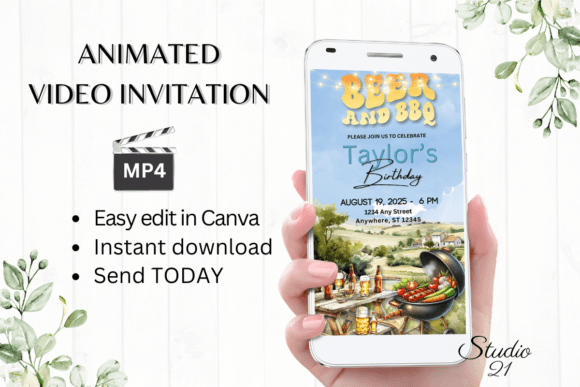
When you’re planning a backyard barbecue for a birthday, the last thing you want is to run to the store for invitations or wait days for proofs to come back. A Digital BBQ Birthday Party Invitation changes that completely. You download, edit, and send within minutes. There’s no software to install, no fonts to hunt down, and no waiting for approvals. The entire process happens inside Canva, right on your computer or even your phone. Once you’re done, you download it as an MP4 file and share it through text, Messenger, iMessage, WhatsApp, or email. It’s fast, flexible, and built for how people actually communicate today.
Where and When This Digital Invitation Works Best
A BBQ birthday party can happen anywhere—a backyard, a park pavilion, a rooftop, or even a campground. The digital invitation fits all those settings because it’s not tied to paper or postage. You send it directly to guests’ phones, and they can save it, forward it, or watch the animated preview. The most common occasions include kids’ birthday parties with bounce houses and hot dogs, adult milestone birthdays where the grill is the centerpiece, and casual family reunions that mix celebration with outdoor cooking. It also works well for last-minute gatherings. If you decide on Wednesday to host a Saturday cookout, you can have the invitation edited and sent before you even finish your grocery list.
Why People Choose an Animated Video Invitation for a BBQ Party
Static invitations can feel flat, especially when you’re trying to set a fun, laid-back tone. An animated video invitation brings movement and energy—flames flickering on the grill, confetti dropping, or the birthday person’s name sliding in with a bounce. That animation catches attention in a crowded text thread. Plus, because you edit everything in Canva, you can adjust the animation style, font colors, and text effects to match your party’s vibe. You don’t need any design experience. The template comes ready to go, and you just swap in your details. If you want to add a line about bringing a side dish or RSVP instructions, you simply type it in.
Editing on Your Phone While Commuting or Relaxing
One of the biggest practical advantages is that you can make basic edits on a smartphone. Busy parents often find themselves with spare minutes in the pickup line or while waiting for a meeting to start. Instead of needing a full laptop setup, you open Canva on your phone, tap the text fields, and personalize everything. You can change the font style, size, color, and even the animation. The template is 1080 x 1920 pixels, which is perfect for mobile viewing. After a few taps, you download the MP4 and send it to your group chat. No need to wait for a proof from a designer or worry about formatting.
Use Cases Across Different People and Situations
This digital invitation isn’t just for parents hosting a kid’s party. It works for event planners putting together corporate cookouts. A small business owner hosting a client appreciation BBQ can brand the invitation with their logo and use the same template year after year. Bloggers and content creators who run parenting or lifestyle sites use animated invitations as examples in their content, showing readers how to throw a party without stress. Educators planning an end-of-year class celebration can send a quick invite to parents without mailing paper forms. Freelancers and side hustlers who organize meetups for local communities find the instant sharing a huge time-saver. Even hobbyists who love hosting themed gatherings can customize the invitation to match their specific BBQ style—Texas brisket night, Hawaiian luau, or classic backyard burgers.
Scenario: A Busy Parent Planning a Child’s Birthday
Imagine a parent with two young kids, a full-time job, and no time for craft stores. They need to invite fifteen families to a Saturday afternoon BBQ party at a local park. They buy the digital template, open the PDF with the Canva link, and within ten minutes they’ve entered the date, time, location, and RSVP number. They choose a font that matches the party theme—something playful but readable. They toggle the animation to a subtle flame effect. Then they download the MP4 and send it through WhatsApp to the class group chat. Within an hour, replies start coming in. No envelopes, no stamps, no last-minute runs to the store. That parent saved at least two hours of logistics and avoided the anxiety of wondering if paper invites got lost in backpacks.
Scenario: A Small Business Owner Promoting a Community Event
A local grill and catering company wants to host a free BBQ birthday celebration for the neighborhood. They want something professional but not overly corporate. Using the same digital invitation template, they add their business logo, change the background color to match their brand, and include a “first come, first served” note. Because they can edit the template any time, they adjust the details after the initial post. They share the MP4 on social media and also email it to their customer list. The animated format stands out in crowded feeds and inboxes. The business owner gets a high open rate and a packed event. The template cost was minimal, and the return in community goodwill and brand visibility was significant.
What to Consider Before Using This Type of Invitation
Before you jump in, there are a few practical points worth noting. First, this is a digital download only—no physical product will be shipped. You’ll receive a PDF containing the link to your Canva template. That means you need an internet connection to access and edit the file. If you plan to share the invitation with older relatives who don’t use smartphones, you might need to send the MP4 via email or even print a screenshot for them. Second, colors may vary depending on the device viewing the invitation. What looks vibrant on your phone might appear slightly different on a friend’s tablet. That’s normal for digital files and not a flaw in the template. Third, while you can make basic edits on a smartphone, more complex changes like swapping out background images or adjusting animation layers are easier on a computer or tablet with a larger screen. If you need heavy customization, use a desktop browser for the initial setup.
How Features Connect to Real Outcomes
The feature list might sound like bullet points, but each one directly affects how smoothly your party planning runs. Immediate access to the template means you can start editing the moment you pay. No downloads or font installations means no technical hurdles. The ability to edit anytime means you can fix a typo without starting over. Sharing as an MP4 means guests can watch the invitation without needing a special app or account. The user guide included in the download helps if you get stuck. These aren’t just nice extras—they remove friction from a process that traditionally involves ordering, shipping, addressing, and mailing. For adults juggling work, family, and social lives, removing that friction is the whole point.
Is This the Right Fit for Your BBQ Birthday?
If your party is casual, digital-first, and built around good food and good company, this invitation fits perfectly. It works best when most of your guests are comfortable with video messages and text sharing. If you have a mixed-age guest list, the MP4 format still works—anyone who can open a video can watch it. The template leans into the fun of a barbecue: warm colors, playful fonts, and an animated touch that feels celebratory without being overdone. You’re not locked into a specific style either. Because Canva gives you full control, you can strip everything down to a minimal look or go bold with brights and bouncing text. That flexibility makes the same base template work for a child’s first birthday and a fiftieth anniversary cookout alike.
Final Thoughts on Going Digital for Party Invitations
Paper invitations have their charm, but they can’t match the speed and convenience of a digital format that you edit in minutes and send instantly. A Digital BBQ Birthday Party Invitation built as an animated video simply makes sense for today’s lifestyle. Whether you’re a busy parent, an entrepreneur, a marketer, or someone who just wants to throw a great party without the extra stress, this approach saves time, money, and mental energy. You get a professional-looking invitation that you control from start to finish. No proofs, no waiting, no hassle. Just edit, download, and send. Your guests will appreciate the effort, and you’ll appreciate having one less thing to worry about before the grill fires up.